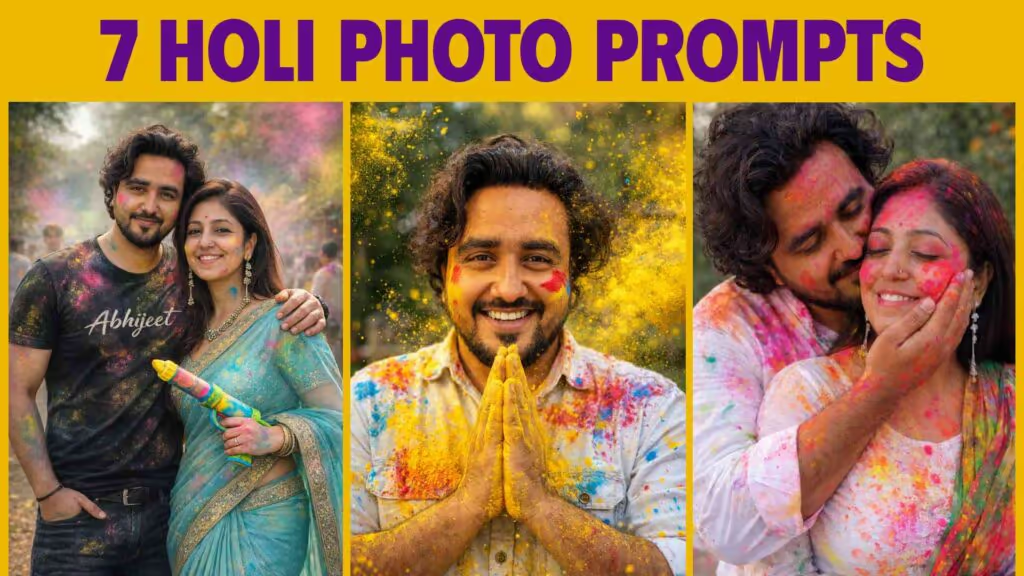
Get 7 optimized Holi AI photo prompts for boys, girls, and couples. Works with ChatGPT and Gemini. Ultra-realistic DSLR results, 100% face match, cinematic 4K quality — copy-paste ready.
Table of Contents
Holi is no longer just about throwing colors — it’s about creating viral, cinematic, ultra-realistic AI Holi edits that look like they came straight from a professional photoshoot.
If you’re searching for:
- Holi AI Photo Prompts For Boys, Girls, or Couples
- Holi AI prompts for ChatGPT and Gemini
- AI Holi edit prompts that actually match your face
- Best Holi prompts for realistic, non-cartoonish results
- ChatGPT trending prompts for Holi 2026
- Gemini trending prompts for festival portraits
You’ve found the right guide. Every prompt below is optimized for face accuracy, cinematic realism, and social media impact — and each one clearly instructs the AI to use your uploaded photo as the face reference so you get a result that actually looks like you.

Why Most Holi AI Edits Fail — And How to Fix It
AI tools like ChatGPT (GPT-4o) and Google Gemini can now produce:
- Ultra-realistic DSLR-quality festival portraits
- Cinematic 4K Holi photographs with color bursts
- Romantic couple Holi shoots
- Professional festival portraits for social media
- Viral Holi DP images for Instagram and WhatsApp
But here’s the truth most guides won’t tell you:
Most people get bad results because their prompts are too vague.
When your prompt isn’t specific enough, here’s what happens:
- Faces change and stop looking like you
- Skin turns plastic or over-smoothed
- Colors look cartoon-like or over-saturated
- The image looks obviously AI-generated
- Powder effects look fake or digitally painted
The 7 prompts in this guide solve every one of these problems by specifying:
- ✅ Exact face reference instruction (forces 100% identity match)
- ✅ Realistic skin texture cues (prevents the plastic look)
- ✅ Natural lighting directions (cinematic, not studio-flat)
- ✅ Camera lens and depth-of-field parameters (DSLR quality)
- ✅ No anime / no cartoon / no illustration override
- ✅ Specific gulal powder physics (particles, mid-air freeze, blur)
What Makes a Good Holi AI Prompt?
Before diving into the prompts, understanding the anatomy of a strong Holi AI prompt will help you customize and build your own variations too.
Every high-quality Holi AI prompt has six layers:
1. Face Reference Lock
Refer to the attached image as the ONLY face reference. Face must match 100% exactly.This is the single most important line. Without it, AI tools generate fictional faces.
2. Realism Override
No beautification. No cartoon style. No anime. No illustration. Fully realistic photographic style.This prevents the AI’s default tendency to “beautify” or stylize.
3. Scene and Styling Description
Clothing, jewelry, pose, and expression — specific enough to feel intentional, not generic.
4. Holi-Specific Color Details
Types of gulal (pink, yellow, red, blue), powder particle physics (mid-air freeze, motion blur, explosion), and how the color lands on skin and clothes.
5. Photography Technical Specs
DSLR, 85mm lens, f/1.8, shallow depth of field, cinematic bokeh, 4K ultra-HDThese terms steer AI output toward photorealistic quality.
6. Final Mood Instruction
The emotional tone — joyful, romantic, royal, cinematic, energetic — shapes the overall feel of the composition.
7 Holi AI Photo Prompts — Copy-Paste Ready
All 7 prompts below are optimized for ChatGPT (GPT-4o) and Google Gemini, and will work in any other AI image generation tool.
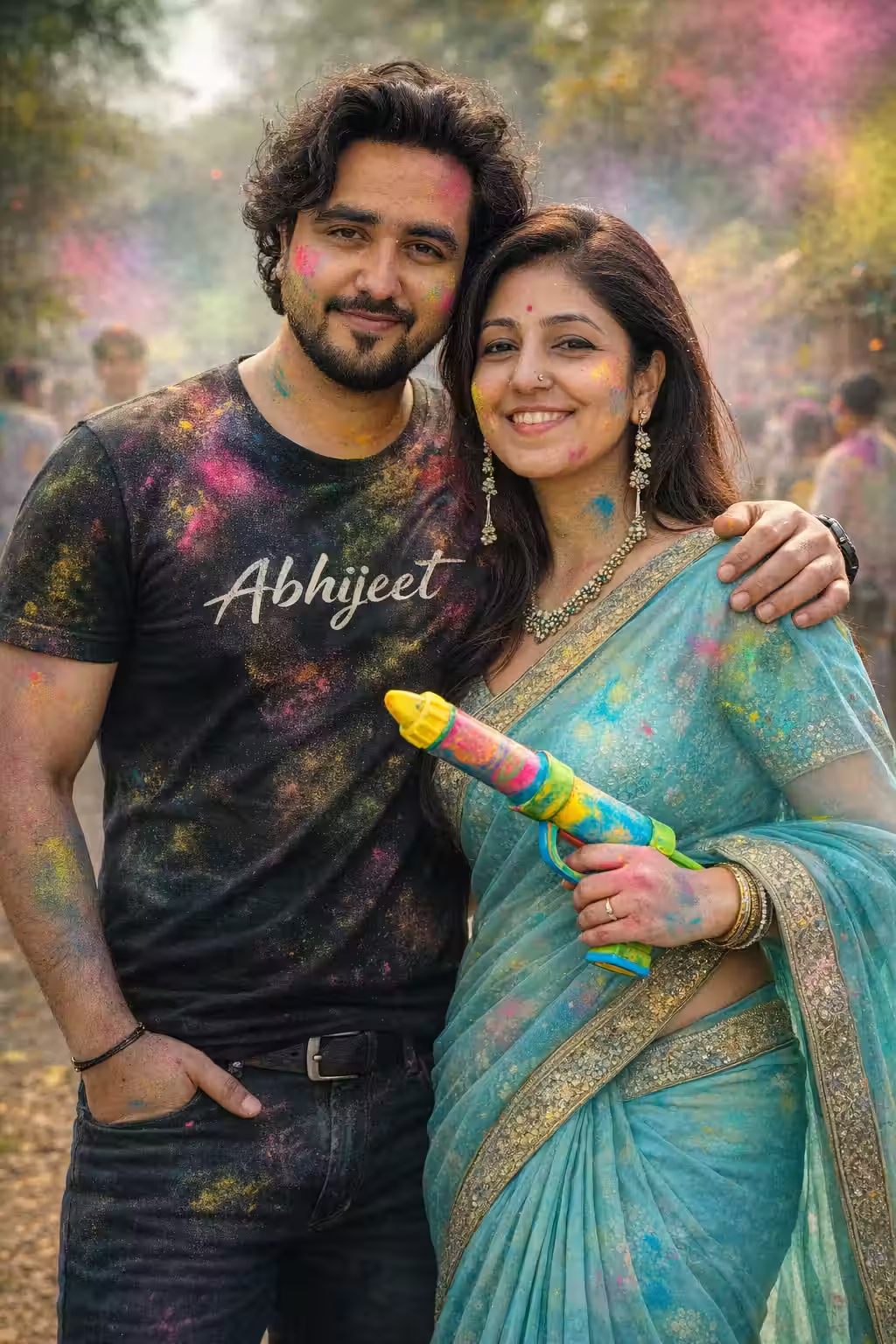
Stylish Holi Couple Photoshoot — Trending AI Photo Prompt (2026)
Generate a viral, reel-style Holi couple photoshoot using this optimized AI prompt. Works with ChatGPT and Gemini. Saree, pichkari, color smoke — cinematic 4K realism.
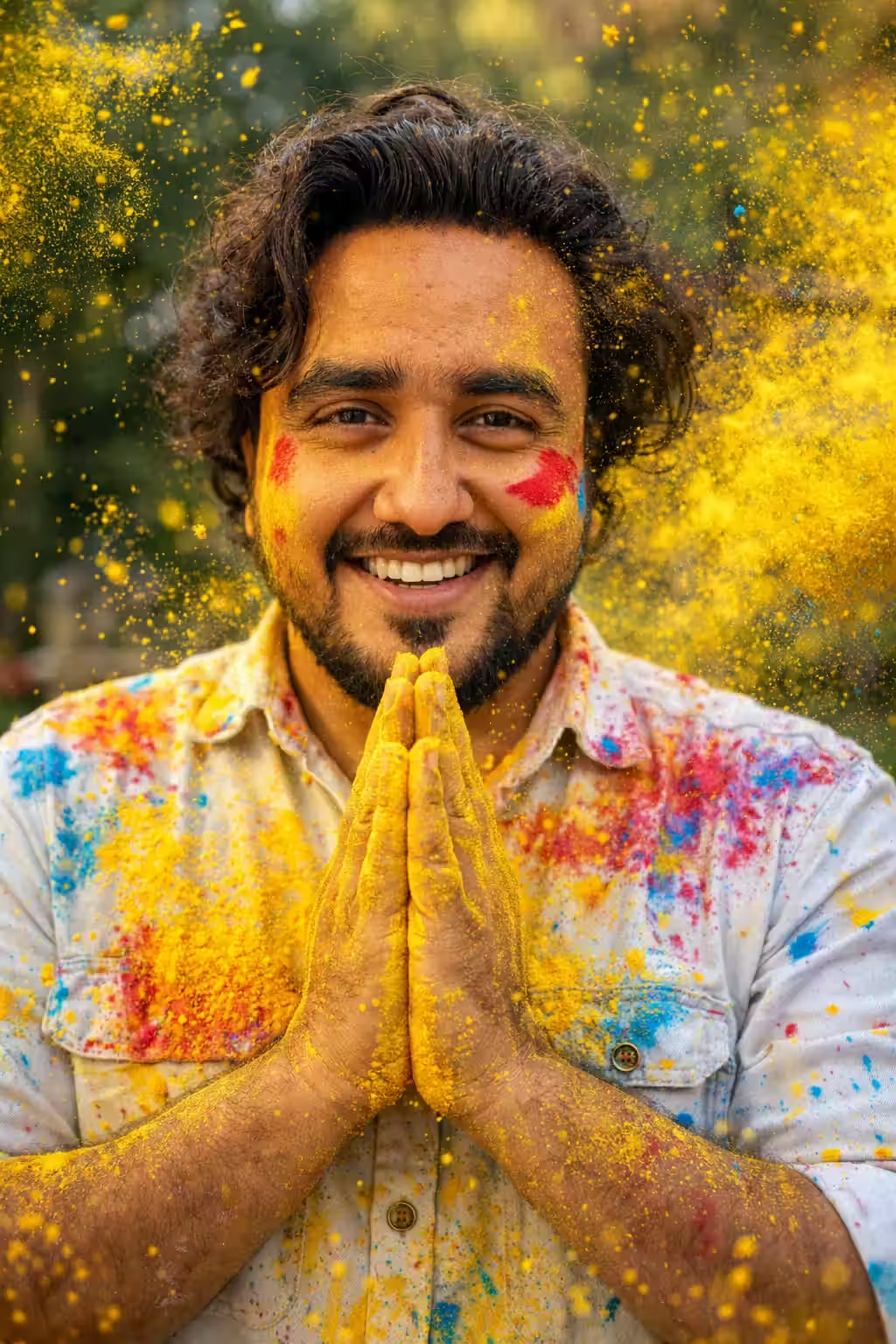
Joyful Holi Portrait For Boys — Prayer Pose AI Photo Prompt
Create a stunning Holi portrait for boys with a namaste gesture and yellow powder burst using this ChatGPT and Gemini AI photo prompt. 100% face match, DSLR realism, 4K quality.
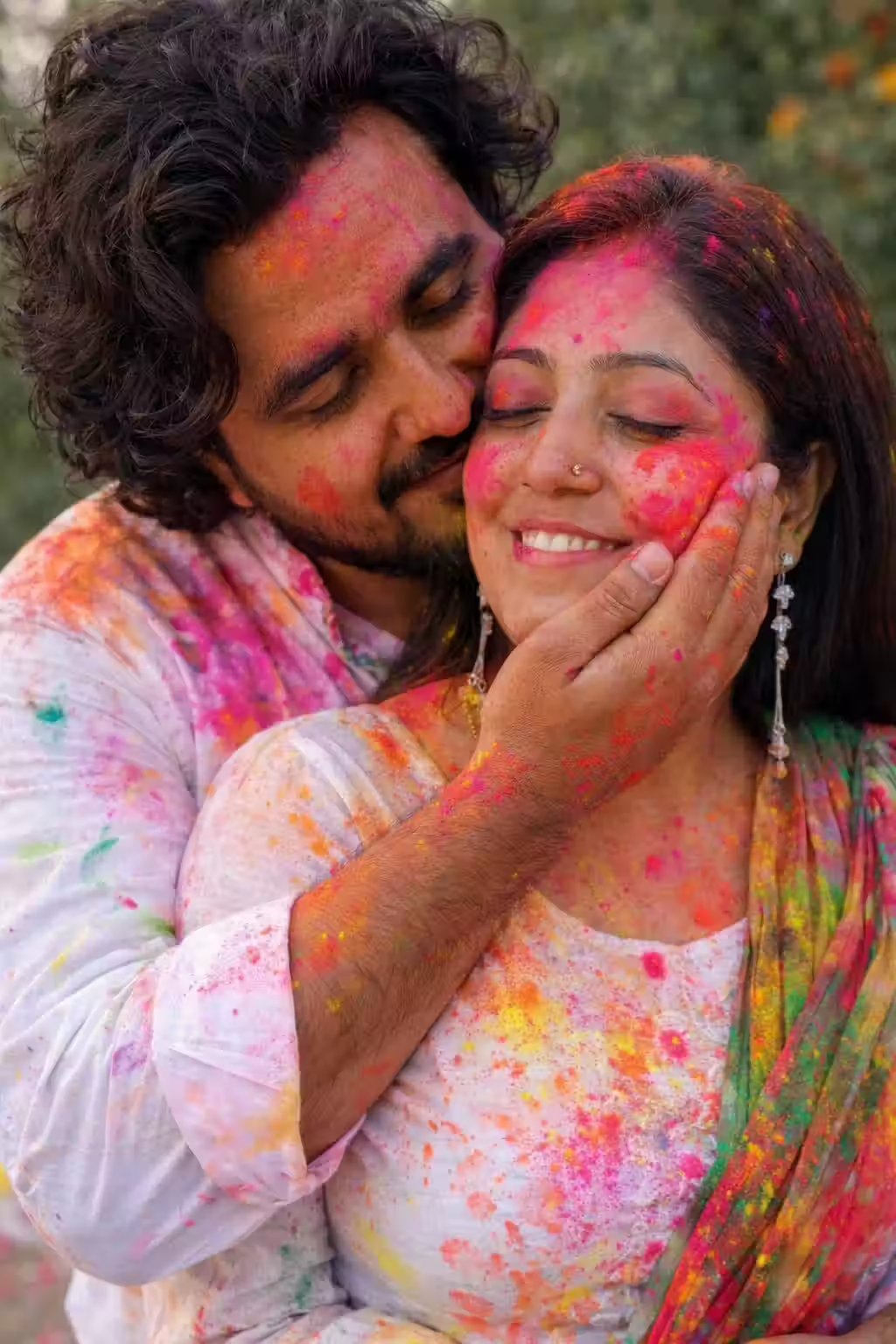
Romantic Holi AI Photo Prompt For Couples — Cinematic Portrait
Generate a deeply romantic Holi couple portrait with white outfits, pink gulal, and a warm embrace using this ChatGPT and Gemini AI photo prompt. Ultra-realistic, 4K cinematic quality.
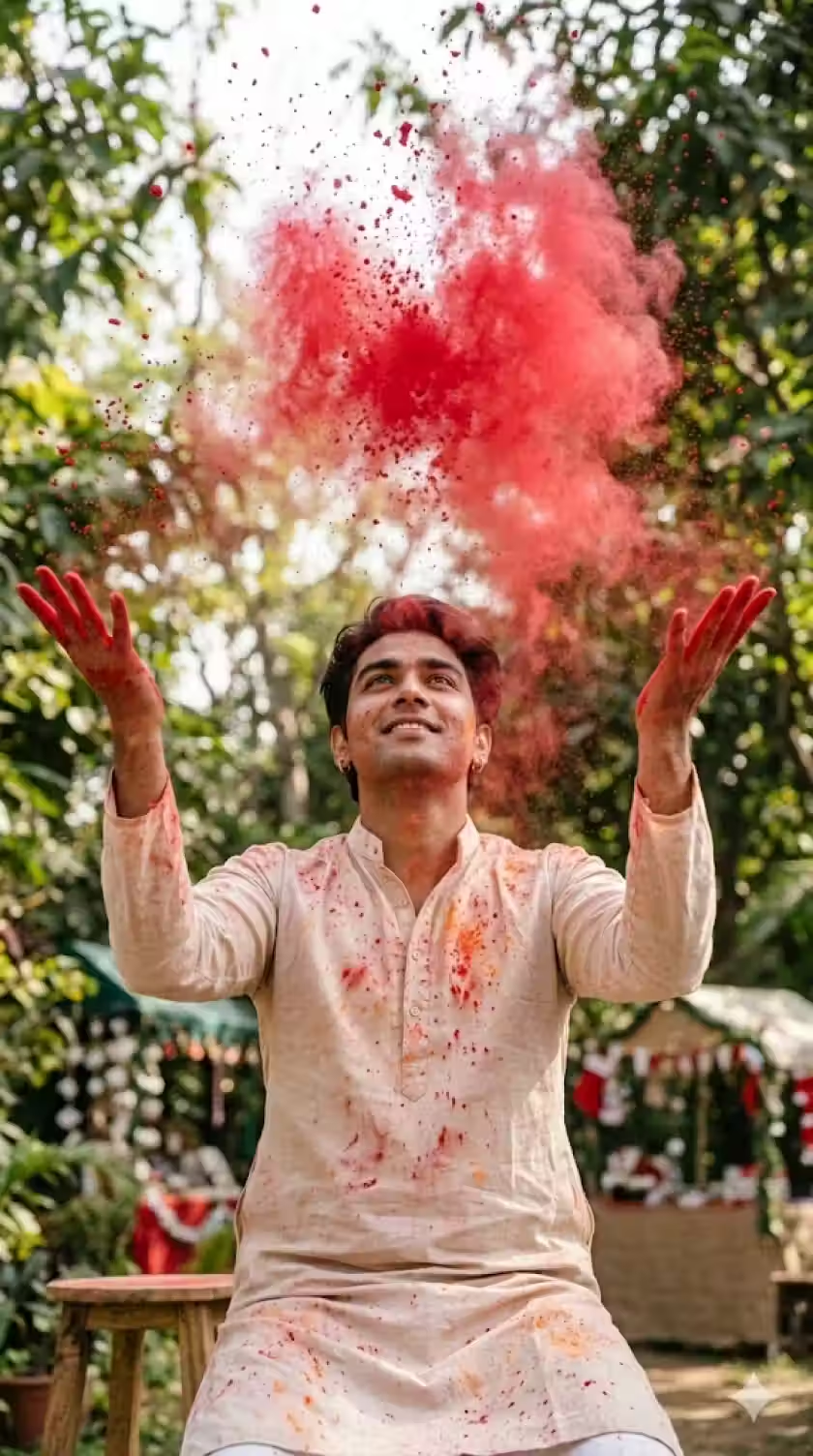
Red Gulal Action Shot — Powerful Holi AI Photo Prompt For Boys
Generate a dramatic Holi action shot of a boy tossing red gulal powder into the air using this ChatGPT and Gemini AI photo prompt. Cinematic lighting, mid-air powder freeze, 4K realism.
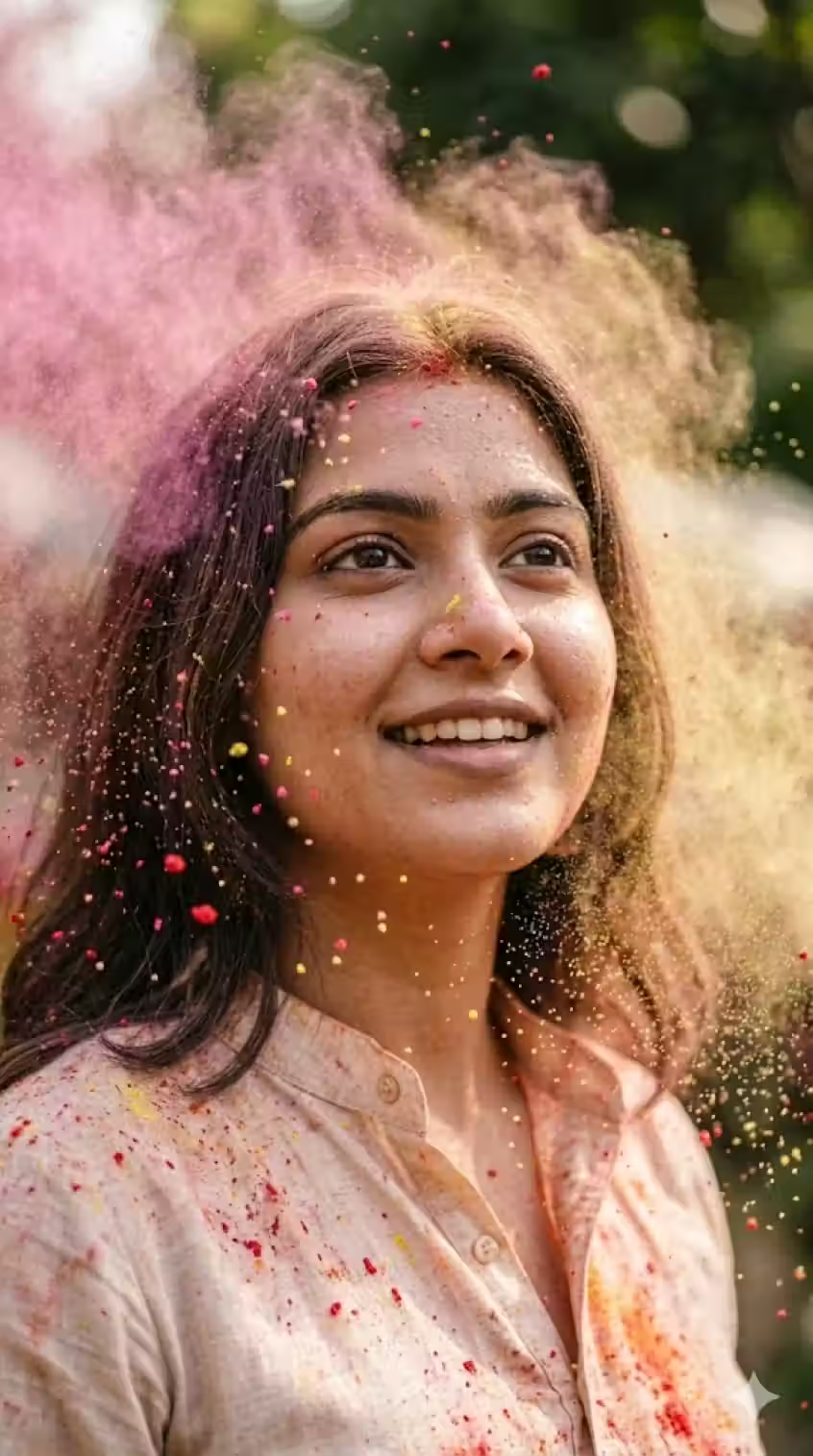
Cinematic Holi Portrait For Girls — Slow Motion Color Burst AI Prompt
Generate a breathtaking slow-motion color burst Holi portrait for girls using this ChatGPT and Gemini AI photo prompt. Fine gulal floating naturally, sharp eyes, cinematic bokeh — 4K quality.
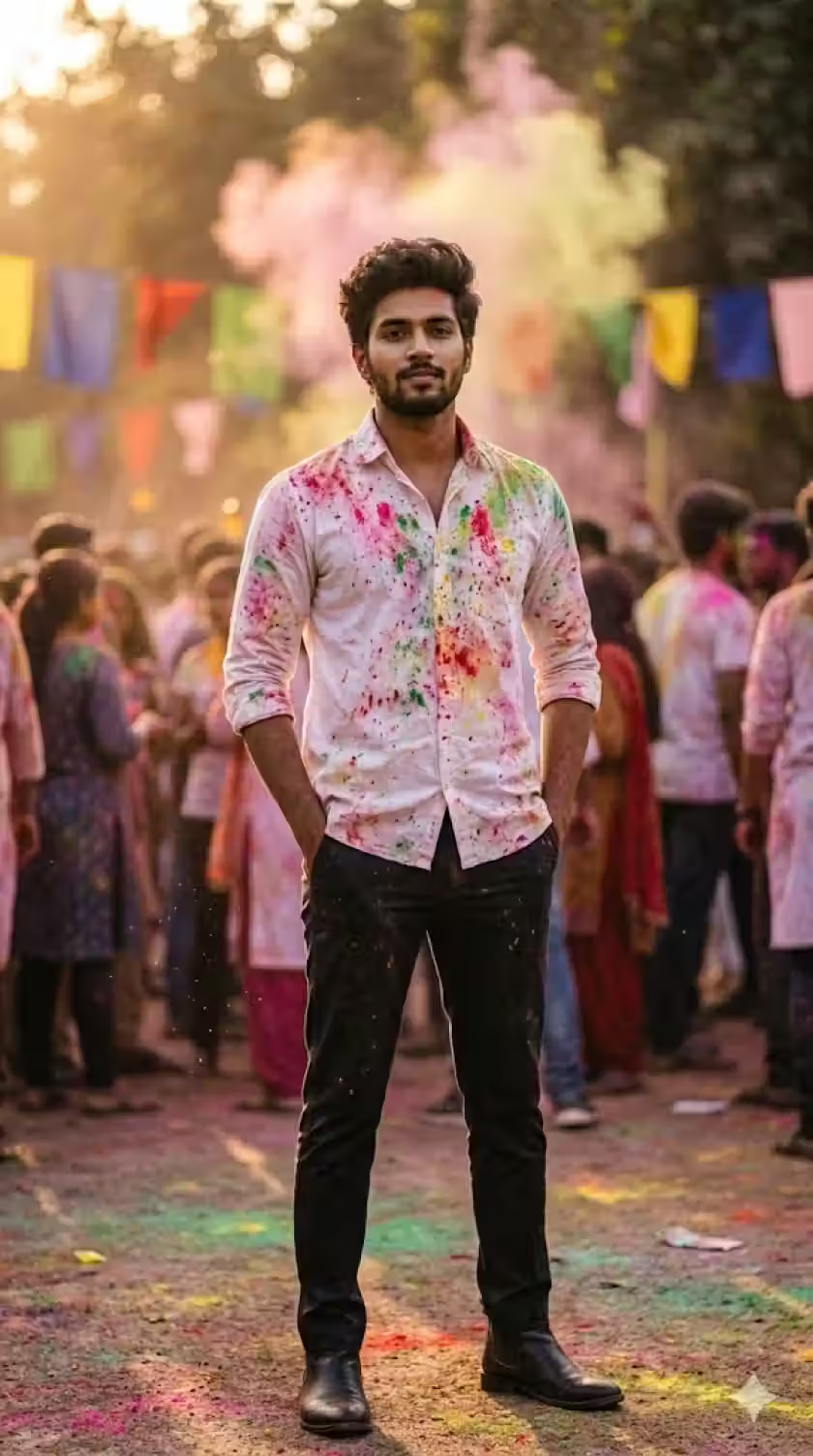
Royal Holi Look For Boys — Confident AI Photo Prompt
Generate a cinematic royal Holi portrait for boys with golden hour lighting and a confident pose using this ChatGPT and Gemini AI photo prompt. DSLR quality, color-splashed white shirt, 4K realism.
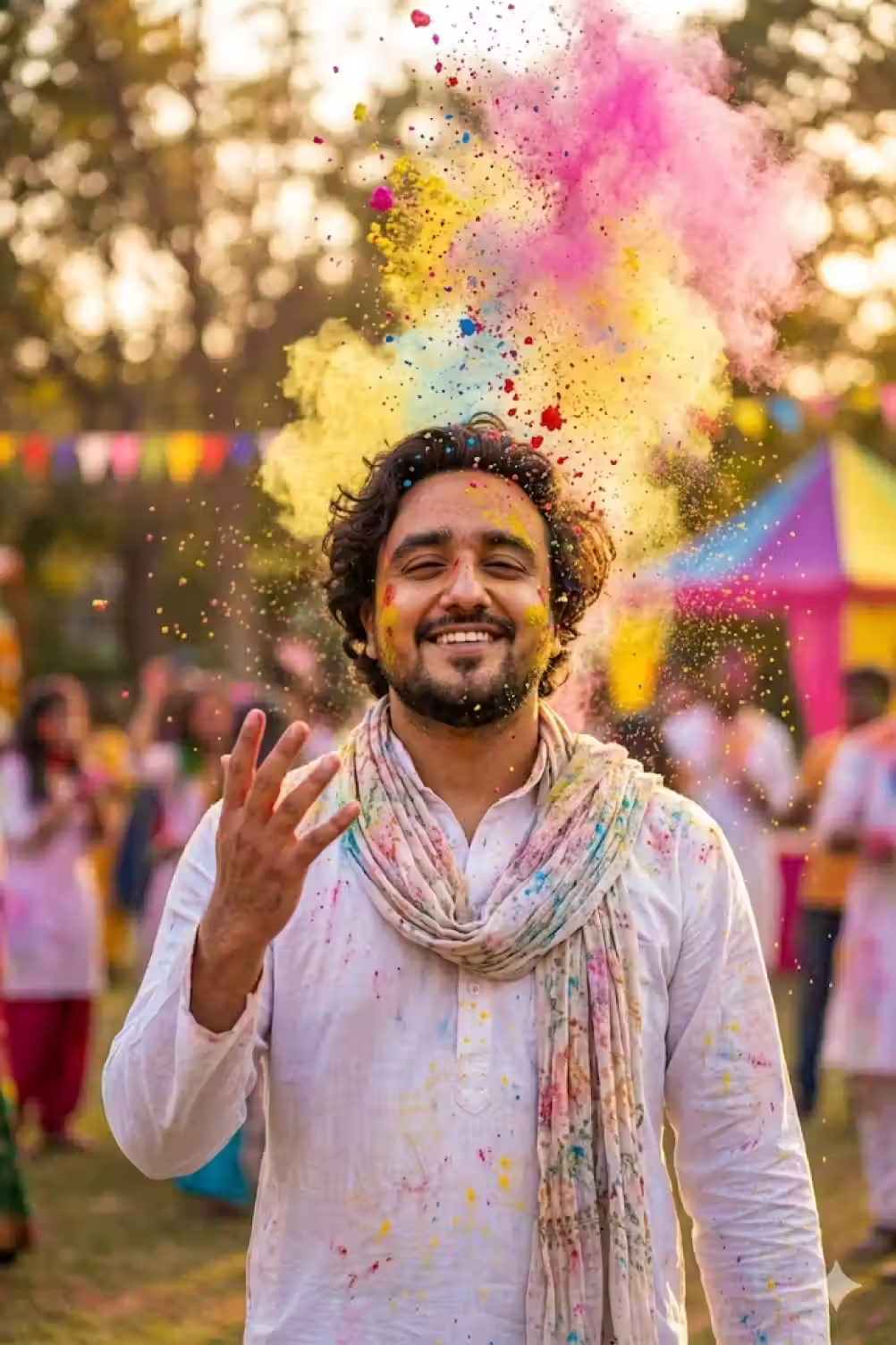
Teen Holi Festival Portrait — AI Photo Prompt for Teenagers
Create a dreamy, vibrant Holi AI portrait for teenage boys using this ChatGPT and Gemini prompt. White kurta, colorful powder shower, golden bokeh — 4K ultra-realistic festival photography.
Holi AI Prompts by Use Case
Not sure which prompt to start with? Use this quick reference table to pick the right one for your situation:
| Who It’s For | Best Prompt | Key Visual |
|---|---|---|
| Couples (trending) | Stylish Holi Couple Photoshoot | Saree + black tee, pichkari, color smoke |
| Boys (festive energy) | Joyful Prayer Pose Portrait | Namaste gesture, yellow powder burst |
| Couples (romantic) | Romantic Holi Couple Prompt | White outfits, embrace, pink gulal |
| Boys (dramatic) | Red Gulal Action Shot | Tossing red powder, beige kurta |
| Girls (cinematic) | Slow Motion Color Burst | Fine powder floating, slow-mo freeze |
| Boys (powerful) | Royal Holi Look | Both hands in pockets, golden hour |
| Teens | Teen Festival Portrait | Colorful shower, white kurta, raised hand |
How to Use These Holi AI Prompts Step-by-Step
For ChatGPT (GPT-4o)
- Open ChatGPT and make sure you’re using GPT-4o (image generation enabled)
- Click the attachment icon and upload a clear, front-facing photo of yourself
- Copy the full prompt from this guide and paste it into the chat
- Hit send and wait for the generation
- If the result isn’t perfect, use the refinement tips in the next section
For Google Gemini
- Open Google Gemini (gemini.google.com)
- Click the image upload button and upload your reference photo
- Paste the full prompt and generate
- Use follow-up messages to refine specific elements
For Other AI Image Tools (Midjourney, Adobe Firefly, etc.)
These prompts work with any tool that accepts text + image input. The face reference instruction at the top of each prompt is the key — make sure the tool supports reference image uploads.
Pro Tips for Getting Perfect Holi AI Results
Use a clear, front-facing reference photo
The quality of your output is directly tied to the quality of your reference photo. Use a well-lit, front-facing image without sunglasses, heavy filters, or face-obscuring accessories. High-resolution is always better.
Never remove the face reference instruction
The line “Refer to the attached image as the ONLY face reference” at the top of every prompt is non-negotiable. Removing it or shortening it causes the AI to generate a random face instead of yours.
Copy the entire prompt — don't summarize it
AI image generation is sensitive to missing context. Summarizing or paraphrasing the prompt almost always leads to lower-quality, less accurate outputs. Copy the full prompt exactly as written.
Iterate with specific follow-up instructions
If the first result isn’t right, don’t start over — refine it. Specific follow-ups work better than vague ones. Instead of “make it more realistic,” try “increase skin texture detail and reduce the smoothness on the face.”
Specify your skin tone if needed
If the AI is changing your skin tone, add a line like “maintain natural [fair/medium/dark/wheatish] skin tone with realistic texture.” This is especially important for diverse skin tones that AI tools sometimes over-lighten.
Add your name to clothing for personalization
Several prompts mention adding a name to clothing (like “Abhijeet” printed on a t-shirt). Replace this with your own name for a personalized touch that makes the image uniquely yours.
Common Holi AI Prompt Mistakes to Avoid
| Mistake | Why It Happens | Fix |
|---|---|---|
| Face doesn’t match you | No reference instruction or vague reference | Add the full face reference line at the top |
| Skin looks plastic / over-smooth | No texture instruction | Add “realistic skin texture, visible pores, natural imperfections” |
| Colors look cartoonish | No realism override | Add “no anime, no cartoon, no illustration, fully realistic” |
| Powder looks painted-on | No physics instruction | Specify “gulal particles frozen mid-air, realistic powder scatter” |
| Background looks fake | No background instruction | Add “natural outdoor background, soft bokeh blur, real location” |
| Too much AI glow | Default AI aesthetics | Add “no artificial glow, no AI skin smoothing, natural shadows” |
Best Platforms to Share Your Holi AI Photos
Once you’ve generated your perfect Holi portrait, here’s where to use it:
| Platform | Recommended Style | Format |
|---|---|---|
| Instagram Reels/Post | Couple or action shot | Square or portrait |
| WhatsApp DP | Solo boy or girl portrait | Square crop |
| Couple or group shot | Landscape or square | |
| Twitter/X | Bold solo or action shot | Any format |
| Holi greeting cards | Romantic couple or family | Portrait |
FAQs About Holi AI Photo Prompts
Which AI tool gives the best results for Holi photo prompts?
Both ChatGPT (GPT-4o) and Google Gemini produce excellent results with these prompts. ChatGPT tends to be stronger at following complex multi-instruction prompts, while Gemini excels at natural skin tones and lighting. Try both and compare outputs for the same prompt.
Why does the AI keep changing my face even when I upload a photo?
This usually happens when the face reference instruction is missing, shortened, or placed at the end of the prompt. Always keep the full face reference instruction at the very beginning of the prompt — before any scene description.
Can I use these prompts without uploading a photo?
Yes, but the output will show a generic fictional person rather than you. If you want a personalized result that matches your appearance, uploading a clear reference photo is essential.
Do these prompts work for dark or wheatish skin tones?
Yes — and they’re specifically designed to preserve your natural skin tone. If you find the AI is lightening your skin, add the line: “Maintain natural [your skin tone] skin tone with realistic texture — do not lighten or alter skin color.”
Can I modify these prompts for other festivals?
Absolutely. The structure of these prompts (face reference + realism override + scene + color details + camera specs + mood) works for any festival. Replace Holi-specific elements (gulal, pichkari, powder burst) with elements from Diwali, Navratri, Eid, Christmas, or any other celebration.
How many times should I generate before I get a good result?
Plan for 2–4 generations per prompt. The first establishes the scene, and subsequent refinements improve face accuracy, lighting, and color realism. Most users get a satisfying result within 3 attempts using specific follow-up instructions.
Can I use these for professional or commercial use?
For personal use, social media, and greetings — these are great. For commercial use, always review OpenAI’s and Google’s current usage policies for AI-generated content before publishing commercially.
Holi AI Prompts vs. Generic Prompts — Why Specificity Wins
To show you exactly why these prompts produce better results, here’s a side-by-side comparison:
Generic Prompt:
“Create a Holi photo of me”
What you get: Cartoon-style illustration, random face, flat colors, no depth
Optimized Prompt (from this guide):
“Refer to the attached image as the ONLY face reference. Face must match 100% exactly… DSLR, 85mm lens, shallow depth of field, cinematic lighting… 4K ultra-HD…”
What you get: Photorealistic DSLR-quality portrait, your face, cinematic depth, natural powder physics
The difference isn’t the tool — it’s the prompt quality. Every extra detail you give the AI is a creative decision you’re making, not leaving to chance.
Related Guides You’ll Love
- 10 ChatGPT Caricature Prompts — Viral Copy-Paste Ready
- 5 Best Father & Daughter Prompts for Gemini AI
- Advanced Father & Daughter Gemini Prompts — 5 Cinematic Styles
Final Thoughts: Holi + AI = Unlimited Creative Possibilities
The best Holi AI photos of 2026 won’t come from the most expensive tools — they’ll come from the most detailed, thoughtful prompts.
These 7 prompts give you a professional starting point for every scenario: solo portraits for boys and girls, romantic couple shoots, action shots, cinematic bursts, and milestone festival moments. Each one is engineered to prevent the most common AI photography failures and deliver results that genuinely look like expensive professional photoshoots.
Use them as-is, or customize them further with your own styling preferences. The formula is there — now make it yours.
Wishing you a colorful, vibrant, and joyful Holi. 🎨
🚀 Get More Festival AI Prompts
Access our full library of tested, production-ready prompts for every festival and occasion:
- Diwali AI portrait prompts
- Navratri and Garba AI photo prompts
- Christmas, Eid, and New Year AI photography prompts
- Seasonal and occasion-based AI photo packs
👉 Visit the UX Mate Prompts Library