Take your Gemini AI family portraits to the next level with 5 advanced cinematic father and daughter prompts. Action shots, low-light, milestone events - copy-paste ready.
Table of Contents
Following the overwhelming response to our first father and daughter Gemini AI guide, the demand for higher-quality, more cinematic AI photography prompts continues to grow. Creators and families are pushing Gemini beyond basic portraits — they want motion, emotion, milestones, and atmosphere.
This advanced collection moves beyond everyday activities into cinematic moments and emotional milestones. These prompts are engineered with specific camera angles, lighting conditions, and micro-expression cues designed to push Gemini’s image generation capabilities to their limit.
The result? Studio-quality AI photographs that feel genuinely human.

Why These Advanced Prompts Produce Better Results
Most AI family photo prompts fail for the same reason — they describe what people are doing, but not how the camera sees it.
Creating a believable father and daughter prompt for Gemini at a cinematic level requires defining:
- Camera angle — low-angle, eye-level, overhead, 85mm portrait compression
- Lighting conditions — backlit rim light, warm sparkler glow, overcast soft fill
- Depth of field — tight bokeh to separate subjects from background
- Micro-expressions — wonder, pride, focus, joy — not just “smiling”
- Motion cues — shutter speed language that tells the AI to capture movement
The prompts below include all of these layers. That’s what separates a generic AI family photo from something that looks like it belongs in a magazine.
Watch: How to Use Gemini to Create & Edit Photos
5 Advanced Father & Daughter Cinematic Prompts for Gemini
Each prompt below targets a different photographic challenge — motion, low light, detail, candid energy, and formal milestones. All are copy-paste ready.
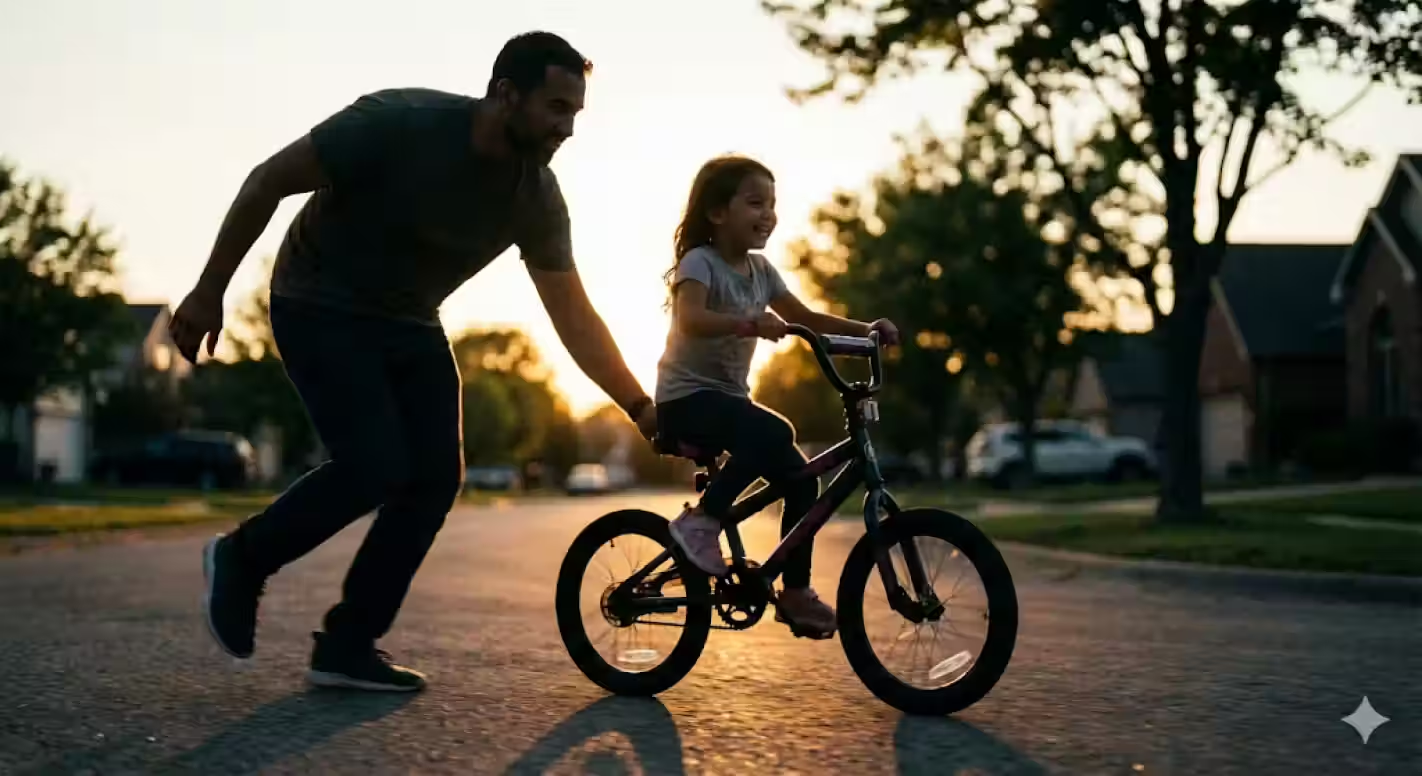
First Bicycle Ride — Advanced Gemini AI Father & Daughter Prompt
Generate a cinematic action shot of a father helping his daughter ride a bicycle at sunset. Advanced Gemini AI prompt with rim lighting, bokeh, and motion realism.
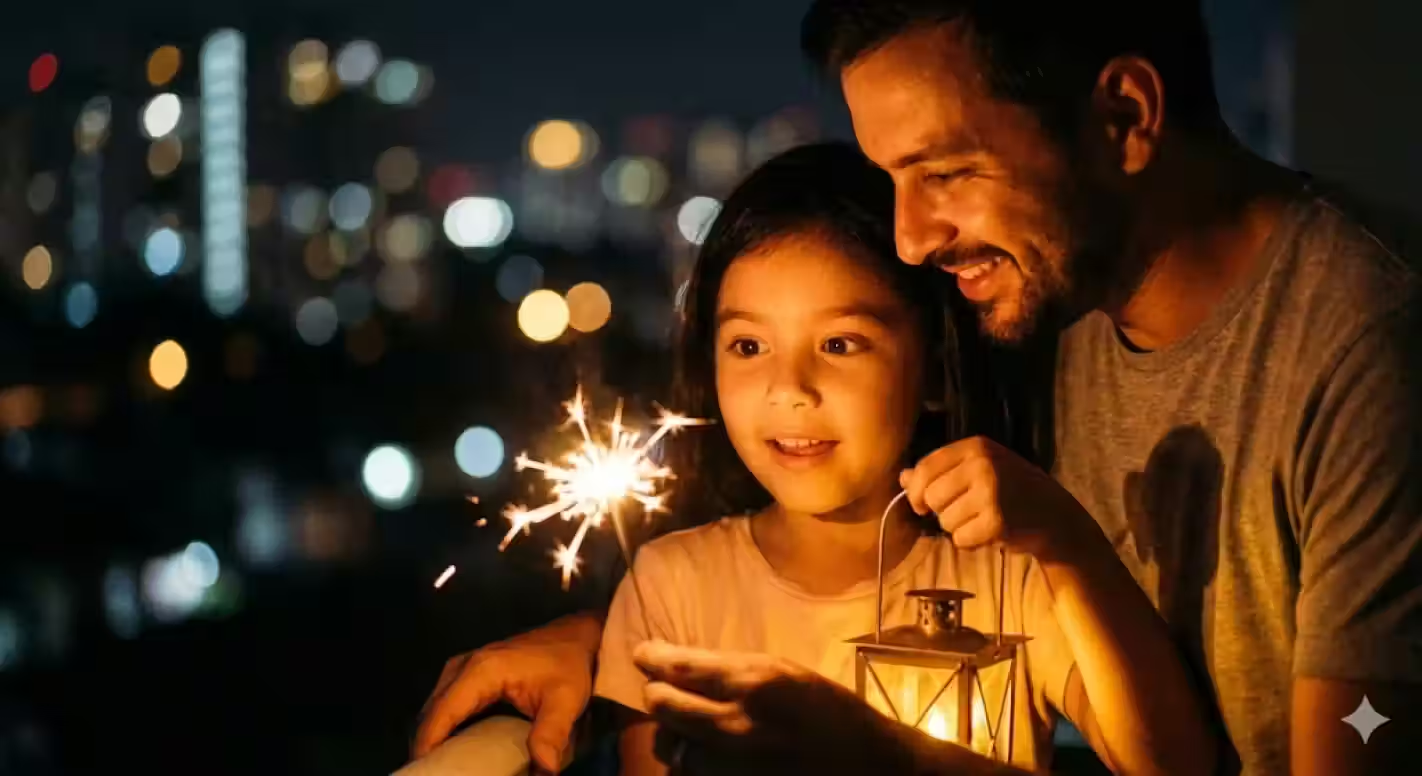
Festival of Lights — Advanced Gemini AI Father & Daughter Prompt
Generate a stunning low-light night portrait of a father and daughter sharing a sparkler or lantern at a festival. Advanced Gemini AI prompt with warm golden glow and bokeh city lights.

Musical Duet — Advanced Gemini AI Father & Daughter Prompt
Generate a peaceful, artistic indoor portrait of a father playing guitar with his daughter. Advanced Gemini AI prompt with soft afternoon light, hand detail focus, and cozy living room atmosphere.
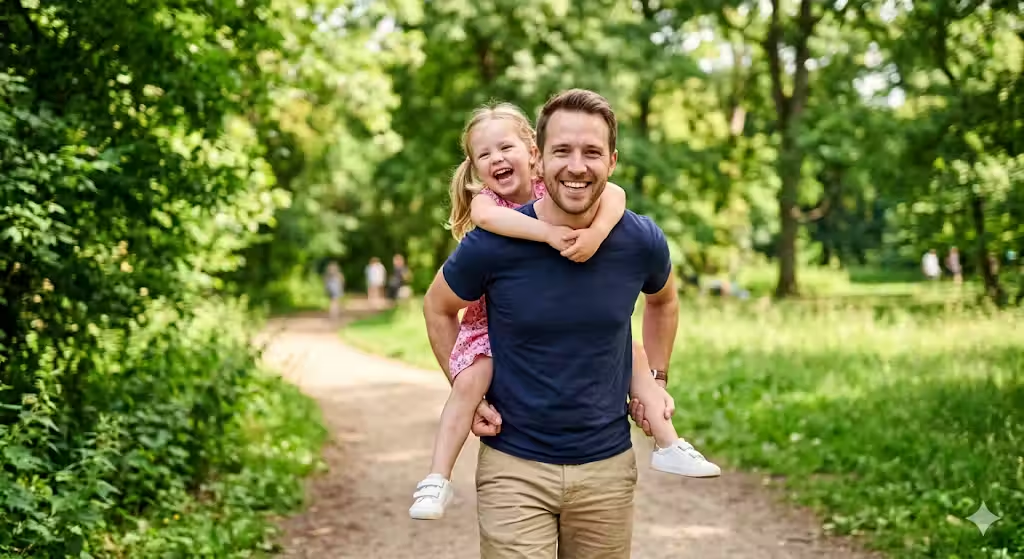
Piggyback Ride — Advanced Gemini AI Father & Daughter Prompt
Generate a joyful, candid outdoor photo of a father giving his daughter a piggyback ride in a green park. Advanced Gemini AI prompt with dynamic posing, natural daylight, and genuine energy.
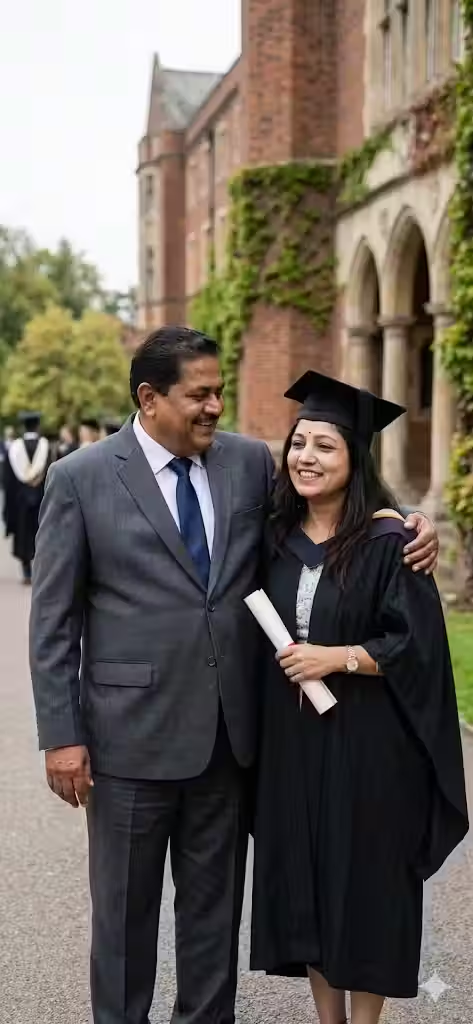
Graduation Moment — Advanced Gemini AI Father & Daughter Prompt
Generate a formal yet emotional graduation portrait of a proud father and his daughter in graduation gown. Advanced Gemini AI prompt with soft overcast lighting and realistic fabric texture.
How These Prompts Handle Gemini’s Hardest Challenges
Each of the 5 prompts above is built to overcome a specific technical limitation of AI image generation. Here’s what each one is designed to solve:
| Prompt | Core Challenge Solved |
|---|---|
| First Bicycle Ride | Motion blur, object-person interaction (bike + hands + body) |
| Festival of Lights | Multiple warm light sources, low-light skin tone accuracy |
| Musical Duet | Hand and finger detail, instrument texture, indoor ambient light |
| Piggyback Ride | Dynamic posing, weight distribution realism, genuine candid energy |
| Graduation Moment | Formal attire texture, emotional posture, flattering overcast light |
Technical Tips for Gemini AI Family Photos
These modifiers solve the most common problems creators run into when generating multi-person scenes in Gemini.
📏 Fixing Height Differences
When Gemini makes a child the same height as an adult, add:
“Ensure accurate height difference — the father is significantly taller than the child.”
👀 Fixing Eye Direction
When subjects look randomly off-frame, specify:
“Both subjects are looking directly at each other” or “Both are looking directly at the camera lens.”
🎨 Eliminating the Plastic AI Look
To avoid the airbrushed, over-smoothed appearance that gives away AI generation, always include phrases like:
“skin texture,” “natural imperfections,” “non-studio candid lighting,” “film grain”
📷 Preventing Face Blending in Wide Shots
Face distortion is most common in wide-angle compositions where faces are small in the frame. Fix it by specifying:
“Mid-shot” or “close-up portrait” — this forces Gemini to dedicate more resolution to facial features.
🔄 Maintaining Face Consistency Across Iterations
After you get a composition you like, but want to tweak lighting or background, add:
“Keep all facial features exactly as they appear in the previous generation. Adjust only the [lighting/background/color grading].”
How to Adapt These Prompts for Other Family Combinations
Every prompt in this guide can be adapted for different family relationships with minimal changes:
Grandfather & Granddaughter Replace “father” with “grandfather” and add:
“elderly man with white hair, kind expression, slight wrinkles”
Mother & Daughter Replace “father” with “mother” and adjust body type descriptors accordingly.
Single Parent Scenarios The prompts work identically — just ensure your reference photo is clear.
Full Family (Adding a Third or Fourth Person) Add a line like:
“A mother is also present, standing to the left of the father, arm around his waist.” Always specify exact position (left, right, behind) to prevent Gemini from overlapping figures.
Cinematic Photography Terms That Improve Gemini Outputs
Using real photography language dramatically shifts Gemini’s output quality. Here’s a quick reference glossary of terms worth including in your prompts:
| Term | What It Does in the Prompt |
|---|---|
| Bokeh | Blurs background, separates subjects visually |
| Rim lighting / backlit | Creates a glowing outline around subjects |
| 85mm lens / 50mm lens | Controls perspective compression and portrait flatness |
| Overcast lighting | Produces soft, even, shadow-free illumination |
| Golden hour | Warm, hazy, long-shadow natural light |
| Candid photography | Unposed, natural-looking moment |
| Shallow depth of field | Sharp subjects, blurred background |
| High contrast | Dramatic light-to-shadow ratio |
| Film grain | Adds texture, reduces the “digital” AI look |
Include 2–3 of these in every prompt for consistently more photorealistic results.
Common Mistakes in Advanced Gemini Prompts
Describing emotion without describing the action causing it
Saying “they look happy” produces generic smiles. Instead, describe the action: “the daughter is laughing because flour just fell on her nose” — the emotion becomes a natural consequence of the moment rather than a forced pose.
Overloading the prompt with too many details
There’s a sweet spot. Too few details = generic output. Too many competing instructions = confused output. Aim for 4–6 core details: scene, light source, pose/action, lens style, mood, and one realism modifier.
Not specifying the camera angle
Camera angle is one of the most overlooked prompt elements. “Low angle looking up” vs. “eye-level” vs. “overhead looking down” produces dramatically different compositions from the exact same scene description.
Using the same reference photo for both subjects
For a father and daughter, ideally upload two separate reference photos — one of each person. A single group photo makes it harder for Gemini to isolate and preserve individual face details accurately.
Not iterating after the first output
Advanced prompts often need 2–3 iterations to perfect. The first output establishes composition; subsequent prompts refine lighting, expression, and detail. Never judge a prompt by the first result alone.
FAQs About Advanced Gemini Family Photo Prompts
How do I make the father and daughter look like specific real people in Gemini?
For character consistency, use an image-to-image workflow if Gemini supports it, and always attach reference photos. In the text prompt, describe distinguishing physical features: “father has a short beard, wire-frame glasses, and dark brown hair; daughter has curly auburn hair and freckles.” The more specific the description, the more the output will match the reference.
Why does Gemini sometimes distort faces in family photos?
Face distortion most commonly occurs in wide-angle shots where faces are small in the frame. Switch to a “mid-shot” or “close-up” framing instruction to force Gemini to allocate more detail to facial features. Also, avoid prompts with more than 3–4 people in a single frame for the clearest face rendering.
Can I use these prompts for grandfather and granddaughter images?
Yes — replace “father” with “grandfather” throughout the prompt, and add age-specific descriptors like “elderly man with white hair, kind eyes, and slight wrinkles.” The scene structures and lighting techniques work identically across all family relationship types.
What is the single most important keyword for realistic Gemini outputs?
“Candid photography” is the highest-impact single term. It signals to Gemini that the image should look natural and unposed — the opposite of the rigid, stock-photo aesthetic that AI generators default to. Combine it with “non-studio lighting” for even stronger realism.
How do I prevent Gemini from merging faces or mixing up the two people?
After your base prompt, add: “Keep the father and daughter as two clearly separate, distinct individuals. Do not blend their features.” Also, specifying their relative positions explicitly (e.g., “father on the left, daughter on the right”) significantly reduces face-blending errors.
How many prompts should I try before concluding a scene doesn't work?
Always try at least 3 iterations before moving on. The first establishes the scene, the second refines it based on what went wrong, and the third typically locks in a high-quality result. Many creators give up after one attempt — that’s where most “bad AI outputs” actually come from.
Related Guides
- 5 Best Father & Daughter Prompts for Gemini AI — The Original Guide
- 10 ChatGPT Caricature Prompts — Viral Copy-Paste Ready
- Holi AI Photo Prompts For Boys, Girls, Couples (2026 Guide)
Final Thoughts: Cinematic Thinking is the Real Skill
The gap between a mediocre AI family photo and a genuinely stunning one isn’t the tool — it’s the cinematic thinking behind the prompt.
When you start describing scenes the way a cinematographer or portrait photographer would — in terms of light sources, lens choices, depth of field, and the micro-moment being captured — Gemini produces results that are indistinguishable from professional photography at a glance.
Use the 5 prompts above as your advanced starting point. Adapt them using the technical tips and glossary. Iterate deliberately. And remember:
The best AI photograph isn’t generated in one shot — it’s directed over two or three.
🚀 Get More Advanced Gemini Prompts
Access our full library of tested, production-ready prompts:
- Extended family scene prompt packs
- Low-light and night photography prompts
- Milestone event portrait guides
- Gemini-specific technical modifier sheets
👉 Visit the UX Mate Prompts Library