

Christmas is no longer just about decorations, gifts, and lights — AI Christmas photo trends have taken over social media. From Candy Cane–themed portraits to cinematic holiday shoots, creators are using ChatGPT and Gemini Christmas photo prompts to generate stunning, ultra-realistic images in minutes.
If you’re searching for the best AI Christmas photo prompts, this guide will walk you through 5 trending AI Christmas photo prompts that work perfectly with ChatGPT Photo Generator, Gemini AI, and other AI image tools.
This article explains how to do the AI Christmas photo trend, why it’s viral in the USA, and how you can create scroll-stopping holiday visuals without professional cameras or studios.
Why AI Christmas Photo Trends Are Exploding in the USA
The AI Holiday Photo Trend is booming because it solves three problems instantly:
- No expensive photoshoots
- No editing skills required
- Results look cinematic and social-media ready
Creators are using ChatGPT Christmas photo prompts and Gemini Christmas photo prompts to generate festive portraits for:
- Instagram Reels
- YouTube thumbnails
- WhatsApp display photos
- Holiday ads and branding
- Personal Christmas greetings
The Candy Cane AI trend in particular, is dominating feeds due to its playful colors and high visual contrast.
How to Do the AI Christmas Photo Trend (Step-by-Step)
Before using the prompts below, follow this exact workflow:
- Open ChatGPT Photo Generator or Google Gemini
- Upload a clear, front-facing reference photo
- Make sure:
- Face is visible
- No heavy filters
- Neutral lighting works best
- Copy one prompt exactly as written
- Paste it into the prompt box
- Generate → refine → download
⚠️ Important: Always mention
“Use the attached image as the sole identity reference”
to avoid face changes.
Watch how to use the AI Christmas Photo Prompt
Prompt 1: Candy Cane Christmas Portrait (Most Viral)


🎄 AI Candy Cane Christmas Photo Prompt
Use the attached reference image as the sole identity source.
Generate the same person with identical facial features, skin tone, and proportions.
Do NOT beautify or alter the face in any way.

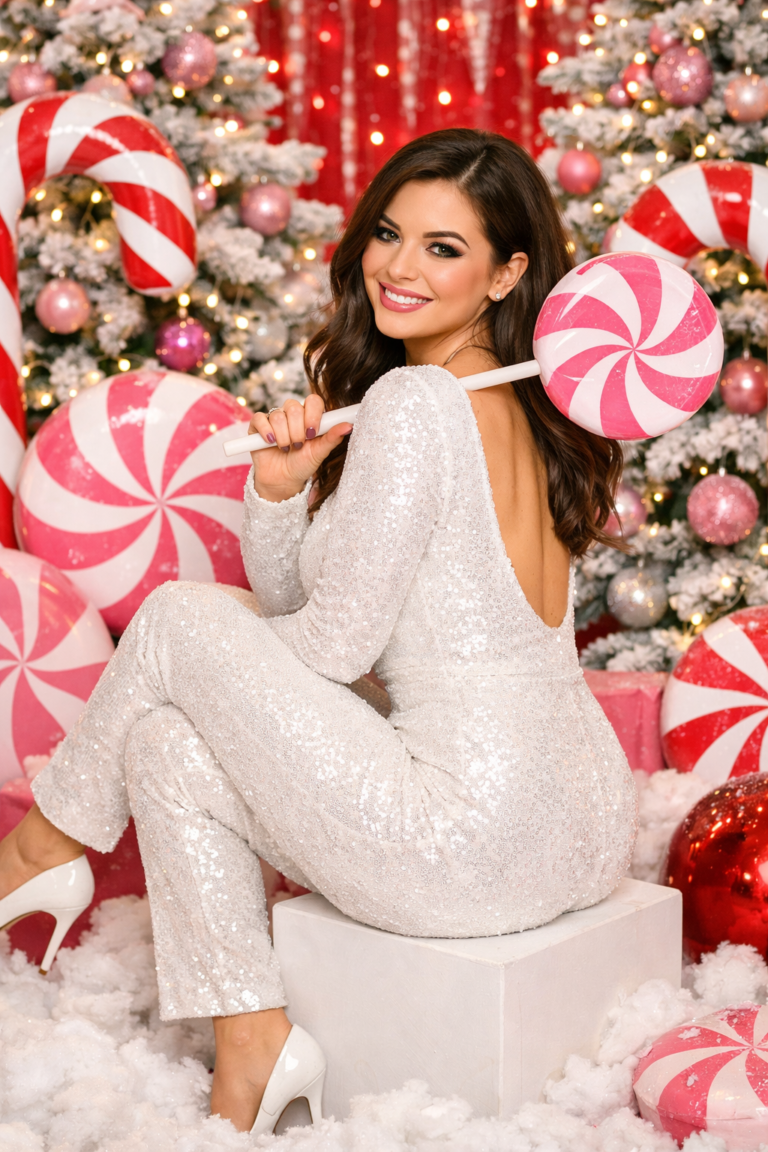
Create an ultra-realistic 8K Christmas portrait shot on a 55mm lens with bright, playful holiday studio lighting.

The subject is in a whimsical Candy Cane themed photoshoot surrounded by giant pink and white peppermint props, snowy ground, festive Christmas trees, and oversized ornaments.

Natural skin texture, realistic pores, sharp focus.
Expression is warm, playful, and confident, smiling toward the camera.

Cinematic depth of field, professional holiday color grading, ultra-high detail.
Why this works:
The AI Candy Cane trend uses high-contrast reds, pinks, and whites, which perform extremely well on Instagram and Shorts.
Prompt 2: Luxury Christmas Editorial Shoot

🎄 ChatGPT Christmas Photo Prompt (Luxury Style)
Use the uploaded image as the only identity reference.
Maintain exact facial structure and expression realism.

Create a luxury Christmas editorial portrait in 8K resolution, shot on a 50mm lens.
Lighting is soft, cinematic, and premium studio style.

The subject is styled in an elegant winter holiday outfit with subtle sparkle.
Background includes blurred Christmas lights, pine textures, and warm golden tones.

Ultra-realistic skin texture, editorial fashion look, high contrast shadows,
magazine-cover quality, professional retouching realism.
Best for:
Personal branding, creators, LinkedIn holiday posts, and premium ads.
Prompt 3: Cozy Home Christmas Aesthetic

🎄 Gemini Christmas Photo Prompt (Cozy Vibes)
Use the attached image as the identity reference only.
Preserve all facial details exactly as provided.

Create a cozy Christmas portrait in a warm indoor setting.
Soft window light, fairy lights, Christmas tree in the background.

The subject is relaxed, natural, wearing winter casual clothing.
Mood is intimate, warm, and peaceful.

Ultra-realistic photography style, natural shadows, shallow depth of field,
film-like tones, authentic holiday atmosphere.
Why people love it:
This prompt feels personal and emotional, perfect for WhatsApp and family sharing.
Prompt 4: Snowfall Outdoor Christmas Portrait

🎄 AI Holiday Photo Prompt (Snow Edition)
Use the uploaded photo as the sole identity source.
Do not modify facial features or expression.

Create a cinematic outdoor Christmas portrait during gentle snowfall.
Soft winter light, cool tones, falling snow captured mid-air.

The subject wears a winter coat and scarf.
Expression is calm, joyful, and festive.

Ultra-realistic details, shallow depth of field,
cinematic holiday movie look, 8K quality.
Best use case:
YouTube thumbnails, holiday reels, winter-themed branding.
Prompt 5: Minimal Studio Christmas Portrait (Clean Look)


🎄 ChatGPT Holiday Photo Prompt (Minimal)
Use the reference image as the only identity source.
Keep facial realism intact with no beautification.

Create a clean, minimal Christmas studio portrait.
White or neutral background with subtle holiday props.

Soft professional lighting, modern aesthetic,
sharp focus on face, realistic skin texture.

Minimalist color palette, premium studio photography,
high-end portrait realism.
Why it converts:
Minimal images work best for ads, websites, and profile photos.
Tips to Get Better Results from AI Christmas Photo Generators
- Use one face per image
- Avoid sunglasses or heavy shadows
- Use clear instructions (lens, lighting, mood)
- Repeat generation 2–3 times for best output
- Slightly tweak expressions if needed
Final Thoughts: AI Christmas Photo Trend Is Just Getting Started
The ChatGPT Christmas photo trend and Gemini holiday photo prompts are no longer gimmicks — they’re becoming a core part of digital creativity.
Whether you’re a creator, designer, marketer, or just experimenting, these AI Christmas photo prompts help you produce professional holiday visuals without studios, cameras, or editing software.
🎄 Bookmark this guide and try all 5 prompts this holiday season.
If you want more AI photo prompts, design trends, and creator tutorials, keep following UX Mate.